
How to work for Arise Virtual Solutions as a CSP Agent
Updated 02/19/2026
Step One: Create an Arise Profile
At the Arise profile setup, first, check the link that says "Is the Arise Platform available in my location?", to find out if Arise is available in your State of Residence.
Enter your email, then a professional username (as this will be for work) and password.
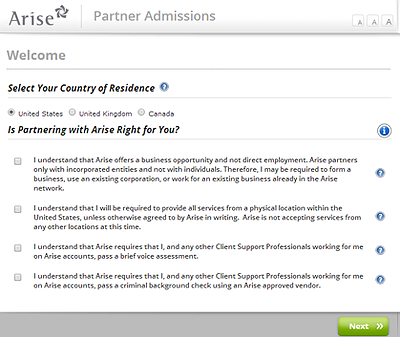
Step Two: Select Country and State
The next step is to select your Country and State. If you agree to the various terms set by Arise, select each check box and then select "Create an account".
Step Three: Enter your Legal Name and Information
Enter your First and Last name. Use your full legal name so that you won’t have issues later if Arise requests your identification information when a client requests it.
Then enter your date of birth. For languages, you can select as many as you are fluent with so that you might be offered opportunities with clients that require your specific language skills.
Step Four: Enter Contact Information
Enter your contact information. When completed, Arise will require that you enter a verification code sent to your phone. Arise no longer allows anyone to complete sign-up without verifying a phone number.
Joining an IBO
After verification is complete, you can either use your own business information or use our Arise IBO directory to find an established Arise IBO.
Select the Arise Virtual Solutions IBO List to find the best Arise IBO for you.
Every IBO Profile on our website includes Arise Info and on how to join them. The Arise IBO will provide you with their FEIN or IB ID which you will need to enter into the Arise Portal.
After you have joined an Arise IBO, you will be able to take the Arise Client assessment that finds the best Arise client opportunities based on your skills. To continue the process, log in at the Arise Portal.
Arise Virtual Solutions Client Reviews
Be sure to check out our client reviews section to assist you with selecting the best Arise Client for your schedule and needs.
Read Arise Client Reviews